P&ID
Symbols Library v4.0 (ISA 5.1-2009) for
AutoCAD & AutoCAD LT
|
Buy
Now | Download
brochure | Download
demo
|
|
| Features... |
-
Compatible with AutoCAD
& AutoCAD LT versions 2010 and newer.
-
Contains
335 P&ID symbols in .dwg format and 78
custom line types.
-
Symbols conform to ISA
Standard 5.1-2009.
-
Symbol legend sheets are
included.
-
Works
with metric and imperial drawing units.
-
ANSI (A - F) and ISO (A0 -
A4) drawing borders included.
-
All symbols can be snapped
to a grid for simple placement and
alignment.
-
Many symbols
are dynamic blocks and can be modified after
they're inserted.
-
Symbols
contain user defined attributes for
creating a bill of material when you've
completed your drawing.
-
30
day money-back guarantee.
|
User
friendly interface...
|
| No
need
to browse through folders every time you need to
insert a symbol. Simply point and click in the
menu to choose from a wide range of ANSI/ISA
P&ID symbols. |
| Choose one of two
ways to access the library... |
- Pull-down menu in AutoCAD's menu bar:
|
|
|
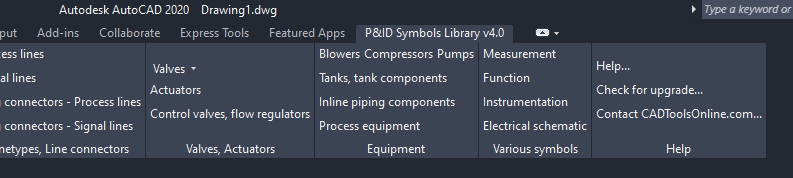
- Add a new tab to the Ribbon:
|
|
|
After selecting a
symbol category, a window appears showing the
available ISA 5.1-2009 symbols. Click on a P&ID
symbol, then click OK to insert it in your drawing.
|

|
Pick an insertion
point in your drawing. Symbols will automatically
break the line when inserted.
|
| A window will appear
ready for your input. The information you add here
is useful for running an attribute or data
extraction to create an equipment list. |
How it works:
|

|
|
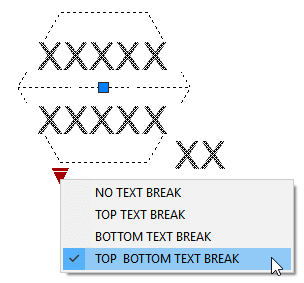
Most symbols can be
visually modified after they're inserted. Left-click
on the symbol to activate the dynamic features.
|
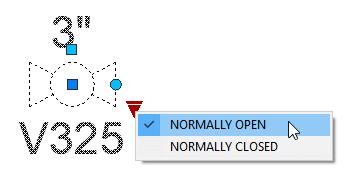
The blue circle grip will rotate the valve
and text.
The blue square grip moves the valve size
text to make room for an actuator.
|
|
|
For a complete list
of all symbols in this library, please download
this
brochure (PDF file).
|
|
About the blocks...
- All symbols are drawn for use with a grid.
Easily set the grid and snap by clicking
"Drawing setup / Borders" in the menu.
- Each symbol is drawn on
layer zero and is set to "byblock". Byblock
allows you to change its color, lineweight,
etc. without exploding it.
- Once inserted, the
symbols will take on the characteristics of
your current layer settings.
|
System
requirements...
- Compatible with AutoCAD and AutoCAD LT 2010
and newer
- 90 megabytes of available space on your C:
drive is required
|
| Try before you buy... |
The demo contains a small sample of symbols and
will function the same as the full version. Legend
sheets and the ability to create a parts list is not
included in this demo.
|
Pricing...
- Single user license - $149.00
- 2 to 8 user licenses - $129.00 each
- Unlimited user license - $2,000.00
|
| Is this a good
deal? |
If you're looking for
a P&ID symbols library to speed up your CAD
department's productivity, consider this. If a CAD
operator making $25 per hour created this library
and spent an average of 15 minutes to draw each
symbol, that CAD operator would be paid $2,094 to
create just the symbols. That doesn't include the
custom line types and the menu system.
|
|
Ordering
options...
|
- Download
your order immediately:

|
The
number of licenses you need equals the
number of CAD workstations where you
need to install the library.
For 9 or more
users, an unlimited user
license is available. Please contact
me to place an order.
|
|
|
|
|
|
|
|
|
|
|
|
|
|
|
|